
最近安装应用时,需要用到npm,但是发现安装速度很慢,不用想也知道,肯定又是特殊原因导致的。
幸好国内有一些机构镜像了资源,不用走出国线路,下载安装速度很快,配置也非常简单。
这里要给淘宝点个赞,镜像源非常稳定。
更换本地npm源
(1)[临时]通过 config 配置指向国内镜像源
# 配置指向源
$ npm config set registry http://registry.npm.taobao.org
(2)[临时]通过 npm 命令指定下载源
# 在安装时候临时指定
$ npm --registry http://registry.cnpmjs.org info express
(3)持久使用
$ npm config set registry https://registry.npm.taobao.org
(4)永久修改镜像源
查看 npm 配置
$ npm config list
# 其他查看配置的方式
$ npm config get globalconfig
$ npm config ls -l
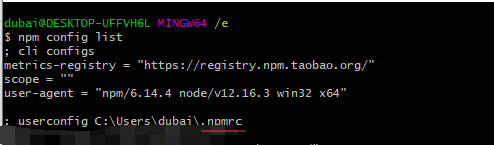
找到并打开配置文件:
~/.npmrc
写入配置:registry=https://registry.npm.taobao.org
3.验证设置是否成功
npm config get registry
# OR
npm info express
4.重要提醒
不推荐通过cnpm 使用,会出现各种莫名的问题。
其他淘宝镜像源
- 开源镜像: http://npm.taobao.org/mirrors
- Node.js 镜像: http://npm.taobao.org/mirrors/node
- alinode 镜像: http://npm.taobao.org/mirrors/alinode
- phantomjs 镜像: http://npm.taobao.org/mirrors/phantomjs
- ChromeDriver 镜像: http://npm.taobao.org/mirrors/chromedriver
- OperaDriver 镜像: http://npm.taobao.org/mirrors/operadriver
- Selenium 镜像: http://npm.taobao.org/mirrors/selenium
- [Node.js]文档镜像: http://npm.taobao.org/mirrors/node/latest/docs/api/index.html
- NPM 镜像: https://npm.taobao.org/mirrors/npm/
- electron 镜像: https://npm.taobao.org/mirrors/electron/
- node-inspector 镜像: https://npm.taobao.org/mirrors/node-inspector/